Scan capture: one photo, taken where you're standing
If you are looking for an app to identify antiques by photo, this is the part of Patina that takes the photo: you open it in your phone browser, tap scan, and the rear camera comes up on the object in front of you. Below is exactly how capture behaves, what it is good at, and the one thing it cannot do yet.
Patina is not open yet, so anything on this page about what it does is what it is being built to do.
The photo you only get one chance at
Nobody searches for an app to identify antiques by photo while sitting at a desk. They search for it crouched in a stranger's dining room with a marked plate in one hand, a queue forming at the till, and a printed price sticker that says four dollars. The question is small and urgent: is this actually antique or just old, and do I put it back.
The usual tools fail at that exact moment for the same reason. General image search is trained on the whole internet, so it answers a photo of a nineteenth century transferware plate with pages of modern reproductions that happen to look similar. Reference charts and hallmark indexes are genuinely good, but they assume you already know whether you are looking at a silver mark, a pottery mark or an importer's stamp, and they assume you have ten minutes. Posting to a collector forum works beautifully and arrives two days after the sale ended.
So the friction is rarely the identification itself. It is capture: getting a usable photo of the right part of the object into the right kind of tool before the moment passes. That is the job this feature does, and it is why Patina is built as something you open on the phone already in your pocket rather than something you plan a trip around.
We should be equally plain about what a photo can and cannot settle. Patina returns maker, era and origin as a second opinion, with a confidence level attached and a persistent note that the result is an AI estimate rather than an expert appraisal. It never returns a dollar value. Identification is our job; valuation belongs to an appraiser, and we say so on every result screen.
How capture works in Patina
- Open Patina in your phone browser
Capture is built to run from a mobile browser, so there is nothing to download in a car park with one bar of signal. You sign in with an email address and password, which is what ties a scan to your account and your history.
- Tap scan and the camera comes up
The capture control asks for the device's rear camera directly. Android Chrome and iOS Safari honour that, so tapping scan opens the viewfinder on the object rather than dropping you into a file browser to hunt for something.
- Frame the part that carries the information
One photo goes with each scan, so choose it deliberately. A mark, a stamp, a signature, a joint, a seam or a foot rim usually tells a model more than a flattering three quarter view of the whole piece. If the mark is unreadable to you, get close and steady rather than artful.
- Send the photo for identification
The photo is processed by an AI vision model that returns maker, era, origin and a confidence level, written on a plain English result screen with the AI estimate disclaimer in place and no price attached.
- Read the confidence, not just the answer
When confidence falls below our threshold, the result carries an appraisal triage flag and a referral link to a vetted appraiser instead of a confident sounding sentence. That is the honest end of a photo based identification, and it is deliberately part of capture's outcome.
- Find the scan again later
Your last ten scans stay in your history with their photos and results, so the plate you were unsure about on Saturday is still there on Sunday when you want to look at it properly.
What that buys you at the sale
Two taps between the object and a second opinion
Open the page, tap scan, take the photo. There is no app store detour, no library search and no choosing which camera to use, because the rear camera is requested for you.
A tool that assumes you are holding something old
The photo goes to an identification built around makers, eras and origins rather than to a general purpose visual search that treats your find as a shopping query.
An answer that admits its own limits
Every result carries a confidence level and a standing note that it is an AI estimate, not an appraisal, so you can weigh it against what you already know about the piece rather than against a number.
A record of what you looked at
Scan history keeps your last ten photos and results, which is useful when you want to compare two similar pieces or revisit a maybe after you have left the building.
A clear route to a human when it matters
Low confidence produces a referral to a vetted appraiser rather than a shrug, so the cases where a photo is not enough end with a next step instead of a dead end.
Where your photo goes
A photo of someone's estate sale is still your photo, so here is the handling, plainly.
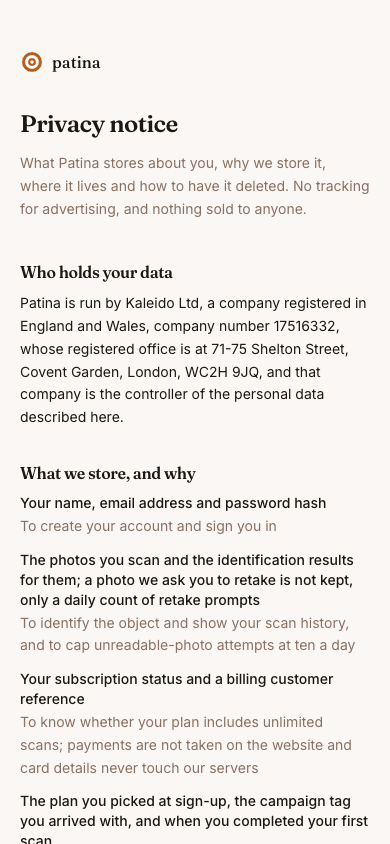
- The photo you scan and its identification result are stored while your account exists, because that is what makes your scan history work.
- Your name, email address and password hash are stored to create your account and sign you in.
- Scan photos are processed by an AI model from Anthropic to identify the object. Subscription payments run through Stripe, so card details never touch our servers.
- The application and its database are hosted on Amazon Web Services in the United States. There is no EU or UK data residency option today.
- To delete your account, write to the contact address on our website from your account email. We remove the account, its photos and its scan history within 30 days.
We hold no security certification or audit, there is no self serve deletion or history export inside the app yet, and we publish no uptime commitment. Those are gaps, not features, and we would rather list them here than let you assume otherwise.
What scanning costs
Free
Free
The occasional finder or inheritance receiver who meets an unfamiliar object a few times a year and needs to see a real result before paying anything.
- Scans per month: 3
- Scan history: Last 10 scans
- Maker, era and origin from a photo
- Honest confidence level on every result
- Appraiser referral when a result needs an expert eye
- Scan history of your last 10 scans
Unlimited
$6.99 / month
The estate sale regular or serious thrift shopper who meets unfamiliar objects several times a month and wants to scan every one of them.
- Scans per month: Unlimited
- Scan history: Last 10 scans
- Dollar values: Not provided
- Unlimited scans every month
- Maker, era and origin from a photo
- Honest confidence level on every result
Where Patina is today
Patina is not open to the public yet. We are building toward the version described on this page, and the waitlist is how you hear when scanning opens and how you tell us which objects keep defeating you, whether that is unreadable silver hallmarks, pottery marks with numbers underneath, or furniture with no mark at all.
If you want the short version to take with you: Patina is made to answer a photo of the thing in front of you with a maker, an era, an origin and an honest confidence level, and to point you at an appraiser rather than guess when the photo is not enough.
Questions
Can I take a picture of an antique to find out what it is?
That is what Patina is built to do. You open it in your phone browser, tap scan, photograph the object or its mark, and the result screen returns maker, era and origin with a confidence level, written in plain English and with no dollar value attached.
Can I upload a photo I already took?
Not today. The scan control requests your device camera directly, and Android Chrome and iOS Safari honour that by opening the viewfinder, so there is no way to pick an existing photo from your library yet. Capture is designed around the object in your hand.
Do I have to install an app?
No. Capture is built to work from a mobile browser, so you can open Patina on the phone you already have with you and start a scan from there.
How many photos can I send with one scan?
One photo per scan, which is why it is worth spending your seconds on the mark, signature, stamp or joint rather than on a full view of the piece.
Will it tell me what my item is worth?
No. Patina never returns a dollar value. Identification is our job and valuation is an appraiser's, and when our confidence in an identification is below threshold the result carries a triage flag and a referral link to a vetted appraiser.
How reliable is a photo identification?
It is a second opinion, not a verdict. Results are AI generated estimates rather than expert appraisals, every result shows a confidence level and a standing disclaimer, and they are not a basis for a purchase or sale decision on their own.
What does it cost?
Three scans a calendar month are free.
Can I try it now?
Not yet. Patina is at the waitlist stage, so joining the list is how you find out when scanning opens and how you tell us which kinds of marks you most want it to handle.